

Skills and MCP servers
Give Agents reusable instructions and authorized external tools.
Skills and MCP servers are Project-owned resources that can be attached to selected Agents.
Skills
A Skill packages trusted instructions and supporting files so you do not have to copy them into every prompt.
- Open Config → Skills → Add skill.
- Upload a
.md,.zip, or.skillfile, upload a folder whose root containsSKILL.md, or import from GitHub or skills.sh. - Review the detected name, description, and author.
- Open an Agent and choose Add skill.
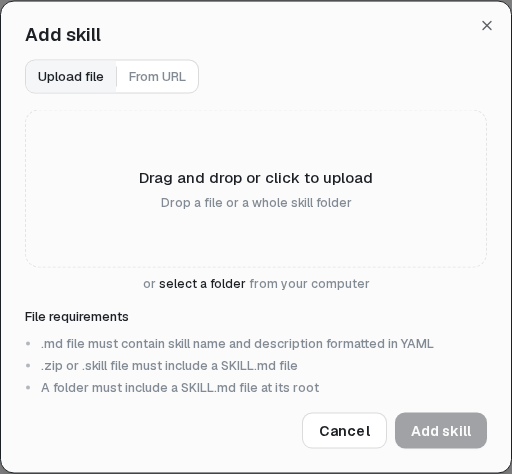
The current console can download, fork, and uninstall a Skill, but it has no in-app editor or update action. Forks are independent copies. Uninstalling can leave existing Agent attachments marked Missing.
MCP servers
- Open Config → MCP servers → Add MCP.
- Enter a name and Remote HTTPS URL.
- Choose OAuth or bearer-token authorization and save.
- Finish authorization, then attach the connection in the Agent editor.
- Test it by asking the Agent to use the tool in Preview or a new Thread.
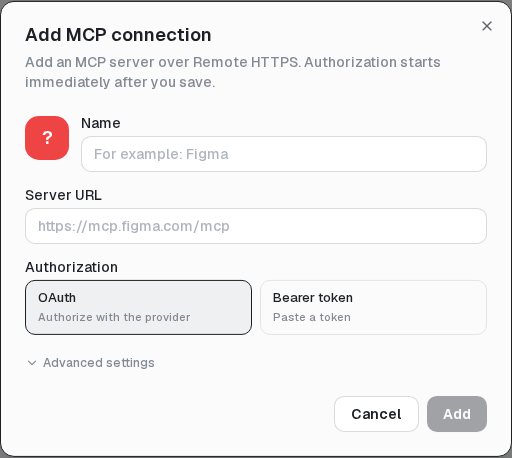
Connected means mosoo has a stored credential; it does not prove the remote server or every tool works. Failures currently surface when an Agent uses the server.
MCP credentials are encrypted and never shown again after entry. Local-process MCP, cross-Project sharing, a connector marketplace, and per-tool selection are not available.