

Environments
Create reusable runtime templates for Agent sessions.
An Environment makes Agent sessions start with a consistent package set, setup script, and variables.
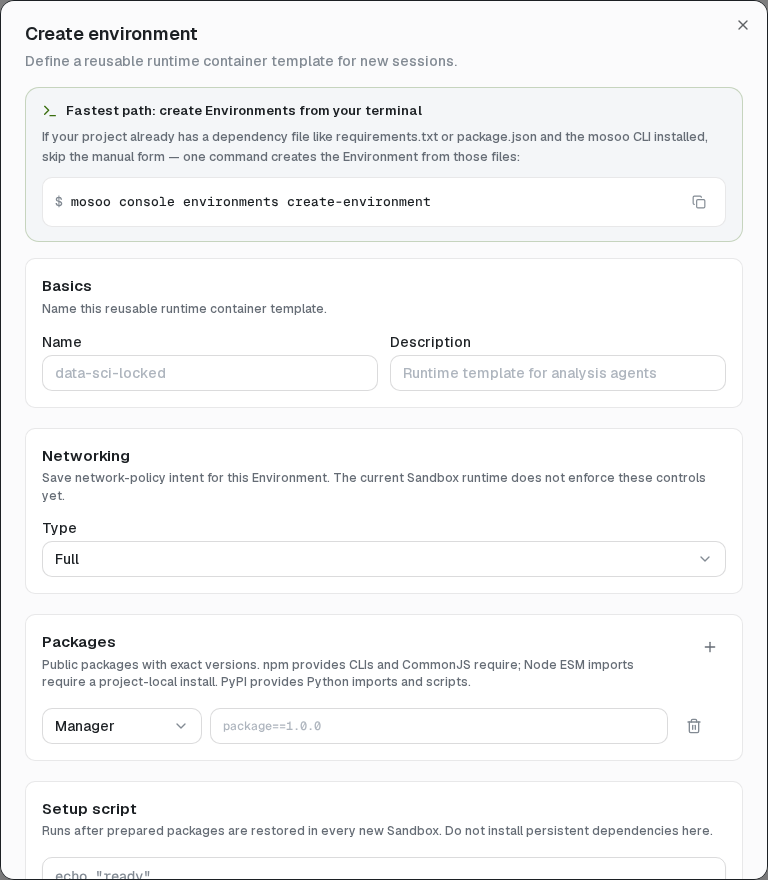
Create an Environment
Open Config → Environments → Create environment, then configure:
- Name and description for the reusable template.
- Packages from public npm or PyPI with exact versions.
- Setup script that runs after prepared packages are restored.
- Environment variables, whose values are encrypted after save.
- Network policy: Full internet access or Limited access with a domain allowlist.
You can also create one from project dependency files with:
mosoo console environments create-environmentAssign and revise
Make an Environment the Project default or select one on a specific Agent. A new session captures the selected Environment revision. Later edits apply only to sessions created afterward; in-flight sessions are unchanged.
Network policies
- Full keeps direct internet access enabled.
- Limited disables direct internet access and filters outbound HTTP/HTTPS traffic through a domain allowlist. The allowlist includes the Environment's allowed domains and the endpoints mosoo needs for runtime control and artifact storage.
Limited access uses a domain allowlist for the Session-owned sandbox. The policy is applied before execution and stays fixed for that Session. Create a new Session to use a different policy.
If Limited cannot be enforced, the runtime rejects sandbox startup rather than falling back to unrestricted access. This includes local development with HTTPS interception disabled. Limited also rejects HTTP_PROXY, HTTPS_PROXY, and ALL_PROXY environment variables, including lowercase variants.
A network allowlist controls destinations. It does not make allowed APIs or MCP tools read-only; use appropriate tool permissions and read-only credentials when accessing production systems.
Package behavior
npm package CLIs are exposed through PATH, CommonJS packages through NODE_PATH, and PyPI modules through PYTHONPATH. Node ESM bare imports require a project-local install. OS packages, Cargo, RubyGems, and Go modules are not Environment package options.
The Project default and any Environment still selected by an Agent are protected from deletion.