
Mosoo Computer: a computer your agent can keep working in
 By mosoo team
The longer you work with an agent, the more you want it to pick up where you left off. The files should still be there. The tools should already be configured. You should not have to explain your working habits from scratch every time.
That is the starting point for Mosoo Computer: give an agent a cloud workspace that can accumulate useful state, then connect it to the places where you already communicate.
From calling a capability to cultivating an agent
In Two kinds of agents: Pet and Cattle, we described two expectations. One is to invoke a capability repeatedly, with a fresh execution instance handling the next task. The other is to keep working with the same agent as its working context grows.
Mosoo Computer is built around the second expectation.
A computer you have used for two years often feels more useful than one fresh out of the box. Its value comes partly from the files, tools, and working habits you have accumulated on it. Those things matter to an agent, too. A model supplies reasoning; a working environment gives the agent somewhere to save results, use tools, and continue its work.
Cultivating an agent does not mean every conversation trains the model. It means keeping useful state. Files, configuration, and memory saved by the runtime can support later work. How that memory is used depends on the runtime you choose.
A Computer for an ongoing working environment
In Mosoo Computer, you name an agent, choose a runtime and machine specification, and configure its model access. The current creation interface offers Codex, Hermes, and OpenClaw.
The point is to avoid rebuilding the working environment for every conversation. Files and runtime state have a place to live. Sessions record individual conversations. Channel connections provide ways to reach the environment.
Persistence does not require a container process to run forever. The current product explicitly distinguishes the two: when a Computer sleeps, its container process stops, while workspace files, runtime state, sessions, and channel bindings remain. Process memory and temporary disk do not persist. The next Web or channel request triggers a wake-up.
The continuity we want to preserve is the continuity of the work.
Start in a familiar conversation
The Web Console uses your existing sign-in. To bring your agent into everyday communication, open Channels and connect Telegram, Slack, Discord, or Feishu / Lark.
A channel determines where a message arrives and where the reply goes. Behind it is the agent and working environment you selected. Adding another conversation entry point does not require setting up another Computer.
There is an important boundary here: the same agent does not mean one merged conversation history. The current product assigns each external conversation its own session. For work that spans channels, explicitly save reusable information in the workspace or use the runtime’s supported memory mechanism. Do not assume another channel automatically receives every earlier message.
Choose the runtime and its model access
The runtime organizes reasoning, tool calls, and the task loop. Model access determines which model it uses and how it obtains access.
Mosoo Computer gives these choices distinct places in the product. Model Access manages your own provider API keys, or BYOK. Each agent then selects its model source and model in Settings. Where supported by the runtime, Subscription offers an account authorization path as well.
An agent’s working setup can therefore be configured independently of account-wide credential management. Available subscriptions and models still depend on the runtime and the account’s access. Connecting an existing subscription does not remove its usage limits or imply that other Computer costs are included.
The architecture between channels, execution, and models
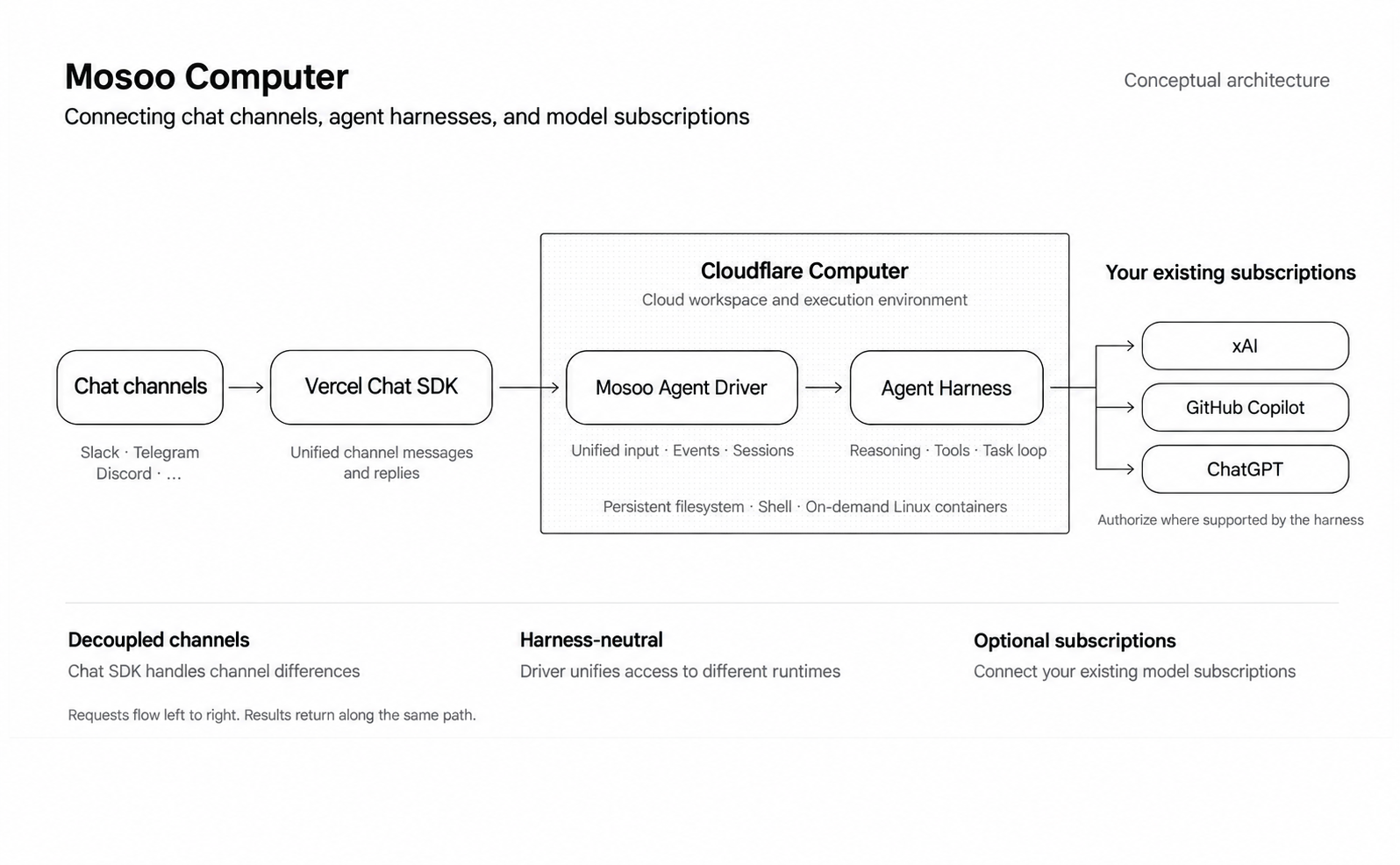
This conceptual diagram preserves the structure of the original. Subscription providers are architectural examples; available combinations depend on the product interface and runtime support.
Read the diagram from left to right. Vercel Chat SDK unifies channel messages and replies. Mosoo Agent Driver unifies inputs, events, and sessions. The Agent Harness handles reasoning, tool use, and the task loop. The cloud environment provides a persistent filesystem, a shell, and Linux containers that run on demand. Model access connects where the harness supports it.
These boundaries allow three choices to evolve independently: where you talk to the agent, how it executes work, and which model it uses. A change of channel should not force you to rebuild a working environment, and a new runtime should have a consistent place to connect.
Begin with one conversation
Mosoo serves developers embedding agent capabilities into applications. Mosoo Computer serves the people working directly with agents. Those different ways of using agents deserve distinct product paths.
Start by creating an agent, configuring its model, and sending a first message in the Web Console. Then connect a channel you use regularly. Over time, keep the files, working agreements, and configuration that are worth carrying forward.
We want the agent’s next task to start from the foundation its last task left behind.